Halloween
Halloween Pet Costumes in AI: Pumpkin, Dinosaur, and Baked Potato
How to preview 2026 pet costume ideas with AI while preserving breed, fur, markings, eyes, and anatomy. Includes a safe pet-costume checklist.
Pet costume content is everywhere in October because it is visual, shareable, and low-effort for the viewer. The pet is the star. If a generated image turns the pet into a different animal or gives it extra paws, the image fails.
This guide covers the pet directions from the 2026 research, the prompt structure that protects the animal, and the safety rules for a real costume.
The directions worth testing
Baked Potato, Glow in the Dark Dinosaur, Stick of Butter, Pumpkin Pet, Christmas Tree, and Headless Horseman all appeared in the research. The strongest photo directions have a simple silhouette and a costume that does not cover the face.
A pumpkin, a butter stick, and a dinosaur hood are easy to read. A glow effect is harder because a still image cannot prove that the material actually glows. Use the image as a concept, not as a product demonstration.
Protect the animal, not just the costume
The prompt should preserve breed, fur color, distinctive markings, eye color, facial appearance, and natural anatomy. It should also say that the costume must not cover the eyes or change the species.
Negative constraints matter: no extra animals, no unnatural paws, no duplicated limbs, no text, no watermark. These are the most common failures in pet edits.
Use a calm, clear source photo
Photograph the pet at eye level with a clear view of the face and chest. Avoid motion blur and harsh shadows. A calm expression gives the model a better chance of preserving the eyes and markings.
Do not use a photo where the pet is visibly stressed. The generated image should not imply that the animal enjoyed a costume it did not wear.
Seasonal workspace
Try the look
JPG, PNG or WebP · up to 10 MB · 1 credit only after success
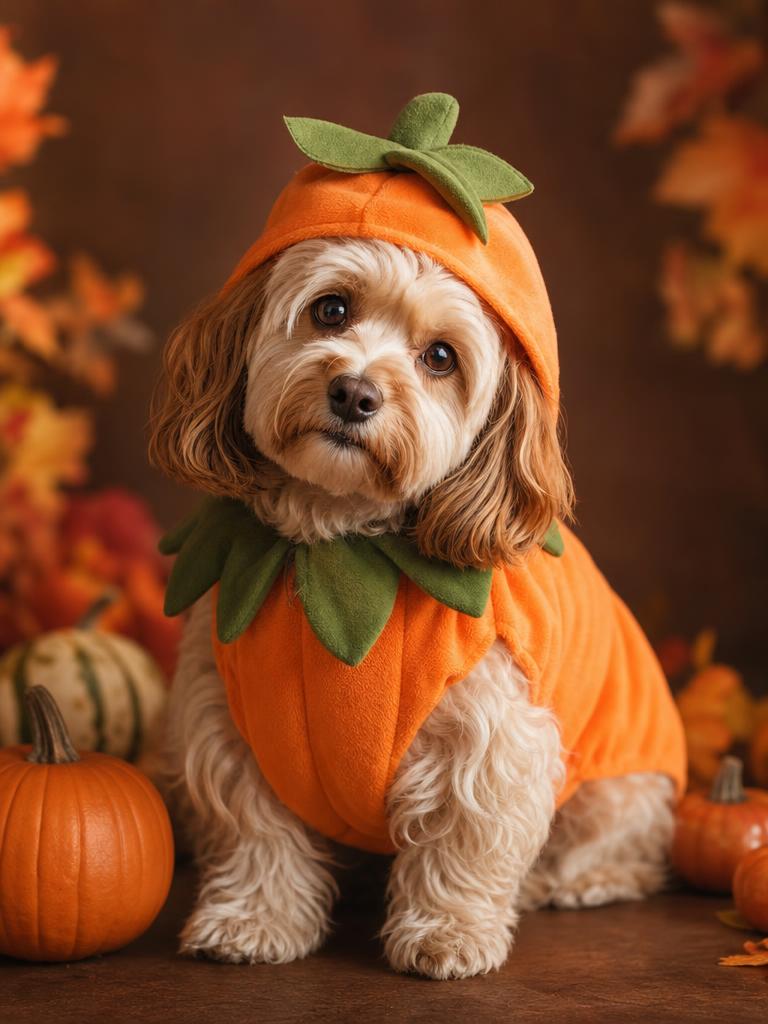
A soft pumpkin costume that keeps the pet recognizable.
Prompt recipe
Use the uploaded pet photo as the primary reference. Preserve the animal's original breed, fur color, distinctive markings, eye color, facial appearance and natural anatomy. Dress the pet in a soft pumpkin-inspired Halloween costume with a small green leaf accessory. Keep the costume fitted naturally without covering the animal's eyes or changing its species. Place the pet in a cozy autumn photography studio with warm lighting and miniature pumpkins. Create a photorealistic professional pet portrait with realistic fur texture and natural shadows. Avoid extra animals, unnatural paws, duplicated limbs, text and watermarks.
New accounts get 5 free credits. Sign in to use them.
What a preview can and cannot tell you
A preview can show whether a color, silhouette, or costume concept suits the pet. It cannot show fit, comfort, breathability, or whether the pet will tolerate the garment.
For a real costume, choose soft material, avoid anything that covers the eyes or restricts movement, and supervise the pet. A generated portrait is not safety advice.
Breed and marking checks
Before you upload, list the features that make the pet recognizable: ear shape, muzzle length, coat pattern, eye color, tail shape. After generating, compare those features one by one. A costume can change the silhouette, but it should not change the breed.
If the pet has a distinctive marking, say it in a custom prompt. “A white blaze between the eyes” is more useful than “keep the markings.” The model needs a specific anchor.
Costume ideas that read at thumbnail size
A pumpkin, a butter stick, a dinosaur hood, and a baked potato all have a strong outer shape. That matters because most pet photos are viewed as small images in a feed. A costume that depends on a tiny label or a subtle pattern will disappear.
Choose one bold shape and one color contrast. A small green leaf on an orange pumpkin is enough. A costume with five competing details is harder to read and harder for the model to keep consistent.
A safe real-world try-on checklist
If you buy a physical costume, check that it does not cover the eyes, restrict movement, or trap heat. Let the pet sniff it before putting it on. Watch for signs of stress, and remove it immediately if the pet freezes, pants, or tries to escape.
A generated portrait is not evidence that a costume is safe or comfortable. Use it to choose a direction, then test the real item under supervision.
The costume should not become the subject
A pet portrait works when the animal’s face is the focal point. If the costume is larger than the pet or covers the ears and eyes, the image becomes a costume product shot. Keep the costume proportional and let the face carry the expression.
For a small pet, a simple bandana or a soft hood reads better than a full-body outfit. For a large pet, a single strong shape such as a pumpkin shell can work without hiding the animal.
A note on sharing pet images
Pet images are personal. Ask the owner before editing someone else’s animal, and do not imply that the pet wore a costume it did not wear. If the image is for a product, keep the real product photo separate from the generated concept.
A clear label such as “AI preview” is enough. It protects the viewer from mistaking a concept for a real photograph without making the post feel like a disclaimer.
If the costume changes the breed
A strong costume prompt can pull the model toward a different animal. If the breed changes, reduce the costume’s visual weight and add a direct breed clause. “A small terrier with a soft pumpkin bandana” is easier to preserve than “a pumpkin creature.”
If the breed still drifts, use a simpler costume and a clearer source. The goal is a portrait of the pet in a costume, not a new species.
What to take away
The best pet costume image is still a portrait of the pet. Keep the face, fur, and markings intact, and use the costume as a supporting detail.
Questions
Can I make a glow-in-the-dark dinosaur pet image?
You can use a prompt for it, but a still image cannot verify a real glow effect. Treat it as a concept.
Will the markings stay?
The prompt asks the model to preserve them. Inspect the face, chest, and paws against the source.
Can I upload two pets?
The current preset expects one pet. Two animals increase the chance of duplicated anatomy and identity mixing.