Halloween
Halloween Couple Costumes With AI: Two Photos, One Scene
How to create a coordinated Halloween couple portrait from two photos without face swapping, identity blending, or a surprise third person.
Couple costumes are a coordination problem. You need two identities, two outfits, one scene, and one light direction. A single-photo model usually cannot do that because it has only one face reference.
The two-photo workflow is the fix. Upload one photo per person, pass both images to the model, and tell it explicitly to keep exactly two people.
Why two photos are better than one
A photo with two people already contains both identities, but it may also contain a third person, a busy background, or an awkward pose. A separate photo per person gives the model a clean reference for each face.
The model still has to compose the pair. That is why the prompt must say “exactly two people” and forbid face swapping, identity blending, and additional characters.
Choose a contrast that reads
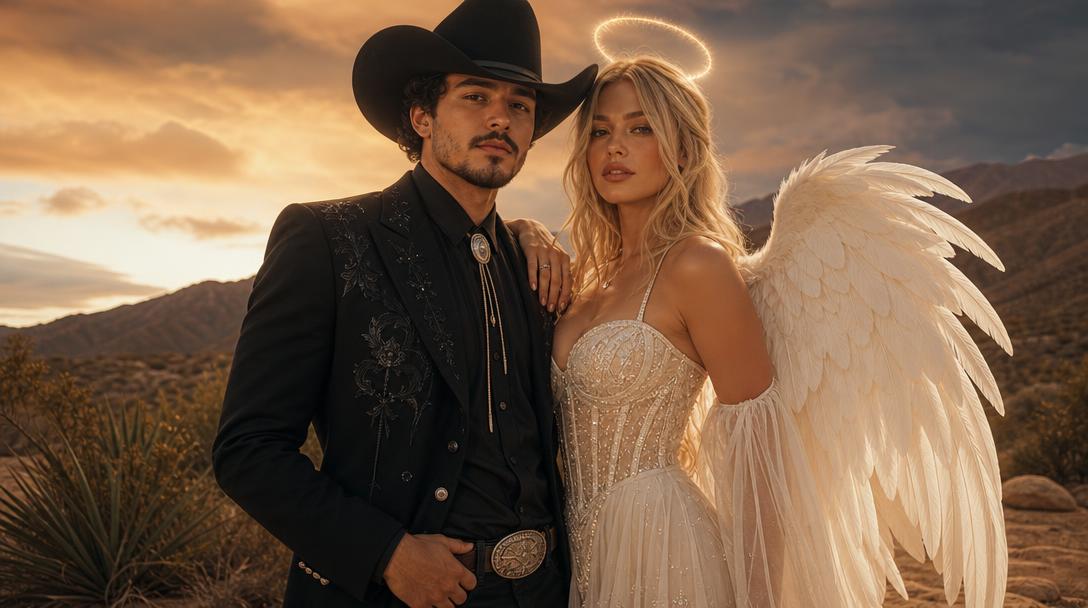
Cowboys & Angels works because the two silhouettes are distinct: a structured western outfit and a luminous angel-inspired outfit. The contrast makes it easy to see whether both identities survived.
Other strong directions include Cyclops and Jean Grey, Wall-E and Eve, Woody and Bullseye, and Gamora and Star-Lord. For an original product, use the visual contrast without copying a protected character.
Match the source lighting
If one photo is warm indoor light and the other is cold outdoor light, the final composite can look pasted together. Try to use two photos with similar light direction and color temperature.
A shared scene and a shared light are more important than a perfect costume match. The viewer reads the couple as a unit when the light and color agree.
Seasonal workspace
Try the look
JPG, PNG or WebP · up to 10 MB · 1 credit only after success
Two photos, two identities, one coordinated scene.
Prompt recipe
Use the two uploaded photos as references. Preserve each person's recognizable facial identity, facial proportions, skin tone, approximate age and body proportions. Create a coordinated Halloween couple portrait: one person in a stylish cowboy outfit and one in a luminous angel-inspired outfit. Place both people in the same warm desert dusk scene with a soft supernatural glow. Keep exactly two people. Do not swap faces, merge identities, add a third person, distort anatomy, add text, logos or watermarks. Use photorealistic editorial fashion photography and consistent lighting on both faces.
New accounts get 5 free credits. Sign in to use them.
Check both faces separately
Compare each face with its source. Look for a swapped jawline, a blended eye shape, or one person’s features appearing on the other. Check the hands and the space between the two bodies for an extra limb or a third person.
If the result fails, simplify the sources. One person per image, face visible, no other people in the background. A clean pair of references is more effective than a busy group photo.
Consent and sharing
A couple image is shared property. Make sure both people agree to the edit and to how it will be posted. If the image is for a public campaign, label it as AI-generated.
If one person is a minor, follow the platform’s rules and avoid any suggestive or adult direction. A costume preview should be appropriate for the people in the photo.
Light direction is the glue
Two portraits with different light directions can look like a collage. Choose source photos with similar light: both lit from the front, or both lit from the same side. If the sources disagree, the model has to invent a compromise, and one face may look pasted in.
The final prompt should name one shared light direction and one shared color temperature. That is more important than matching the costumes exactly. A shared light makes two people feel like they are in the same room.
How to brief two identities
Name each person by position, not by appearance. “The person in the first image wears the cowboy outfit; the person in the second image wears the angel-inspired outfit.” Position references are easier for the model to follow than descriptions like “the taller one.”
Repeat the count: exactly two people. Repeat the prohibition: no face swap, no identity blending, no third person. The repetition is not elegant, but it is effective.
A review sheet for two faces
Compare each face with its own source. Then compare the pair: are the skin tones consistent with the shared light? Are the bodies proportioned believably? Is there a third silhouette in the background?
Check the hands and the space between the two people. A couple image often fails at the point where one body meets the other. Zoom in before you post.
A simple pose brief
Ask for both people to face the camera, shoulder to shoulder, with a small gap between them. A clear pose gives the model two distinct bodies and two distinct faces. Overlapping bodies increase the chance of merged limbs.
If you want a more intimate pose, describe which hand goes where. Ambiguity around hands is a common source of extra fingers. A simple pose is not boring; it is easier to make believable.
When a single group photo is better
If you already have a clean photo of both people in the same light, that photo may be a better reference than two separate portraits. The model can see the real spacing and the real light direction.
Use two photos when the existing group photo has a bystander, a bad crop, or mismatched expressions. The two-photo workflow is a repair tool, not a requirement.
What to take away
A couple portrait succeeds when two identities survive one shared scene. Use two clean photos, a clear contrast, and a prompt that refuses a third person.
Questions
Can I use one photo with two people?
You can, but a separate photo per person gives the model a cleaner identity reference. Use one person per source when possible.
Why did a third person appear?
The model may fill space in the composition. The prompt should forbid additional characters, and the source photos should not contain bystanders.
Can I make a group costume for three people?
The current workflow is built for two. A larger group needs a different composition strategy and stronger multi-reference control.