Two-person edit
Halloween couple photo editor
Two photos go in. One coordinated scene comes out. The workflow asks the model to preserve each person separately, which is the only reliable way to avoid swapped faces.
Updated 2026-10-20
Couple costumes are a composition problem. You need two people in the same light, the same scene, and the same visual language without turning them into one blended face. A single-photo model usually cannot do that because it has only one identity reference.
This page accepts two source photos. The server uploads both, passes both image URLs to the edit model, and uses a prompt that names exactly two people and forbids a third.
The looks on this page
Each image is a GPT Image 2 concept asset. Each preset has a readable prompt and a real upload-and-generate path.
Seasonal workspace
Try the look
JPG, PNG or WebP · up to 10 MB · 1 credit only after success
Two photos, two identities, one coordinated scene.
Prompt recipe
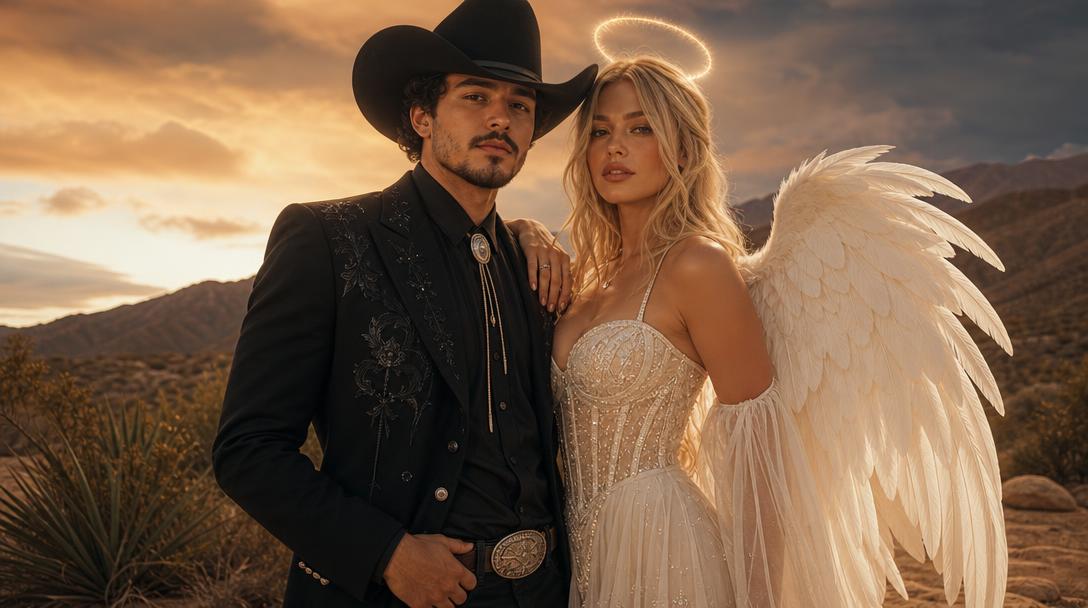
Use the two uploaded photos as references. Preserve each person's recognizable facial identity, facial proportions, skin tone, approximate age and body proportions. Create a coordinated Halloween couple portrait: one person in a stylish cowboy outfit and one in a luminous angel-inspired outfit. Place both people in the same warm desert dusk scene with a soft supernatural glow. Keep exactly two people. Do not swap faces, merge identities, add a third person, distort anatomy, add text, logos or watermarks. Use photorealistic editorial fashion photography and consistent lighting on both faces.
New accounts get 5 free credits. Sign in to use them.
How the two-photo workflow works
Upload one clear photo of each person. The tool uploads both files separately and submits them as two image references. The prompt says to preserve each person’s identity, facial proportions, skin tone, age, and body proportions, and to keep exactly two people.
The model still has to decide how to compose the pair. A front-facing photo for each person gives it the most information. A photo where one person is turned away or partly cropped gives it less to preserve.
Why “Cowboys & Angels” is a good test
The look has two distinct silhouettes: a structured cowboy outfit and a luminous angel-inspired outfit. That contrast makes it easy to see whether the model preserved both identities and whether the costumes stayed separate.
It also has a clear scene: warm desert dusk with a soft supernatural glow. A shared scene is what makes a couple portrait feel coordinated rather than like two separate edits pasted together.
Avoiding the common couple failures
The first failure is face swapping. The model may use one person’s face for both bodies. The second is identity blending, where both faces become a vague average. The third is an extra person, often generated to fill space in the composition.
The prompt explicitly forbids all three. If the result still fails, simplify the source photos: one person per image, face clearly visible, no other people in the background. A clean pair of references is more effective than a busy group photo.
- One person per source photo.
- Both faces visible and reasonably frontal.
- Similar lighting in both source photos helps the final composite.
- Avoid source photos with a third person in the frame.
Composition and consent
A couple portrait is a shared image. Make sure both people have agreed to the edit and to how it will be shared. If the image is for a public post, label it as an AI preview and avoid implying that the costumes are real products.
If one person is a minor, use a photo with appropriate context and follow the platform’s rules for sharing images of minors. Do not generate suggestive or adult content from a photo of a minor.
From portrait to video
Once the couple portrait is right, the video prompt can add a small head turn, wind in the fabric, and drifting dust. Keep the motion simple and keep both faces in frame. A five-second clip with one shared camera move is easier to control than a multi-shot scene.
The video workflow uses the finished portrait as the first frame. That means the identities and costumes are already resolved before the animation starts.
Questions about halloween couple photo editor
Can I upload photos of two different people?
Yes, with their permission. Use one photo per person and avoid a third person in either source.
Will the model keep both faces?
The prompt asks it to, but you must inspect the result. Face swapping and identity blending are known failure modes for multi-person edits.
Can I make a group costume for three or more people?
The current workspace is built for two. A larger group needs a different composition strategy and a model with stronger multi-reference identity control.
Can I use the result as a save-the-date or invitation?
Check the image dimensions, the rights to the source photos, and the platform’s rules. Label the image as AI-generated where appropriate.
Start with one photo
See the look before you commit to the costume.
New accounts get five free credits. A completed image uses one; a failed job releases the reservation.